 8:18
8:18 What Is Node.js?
Node.js Runtime
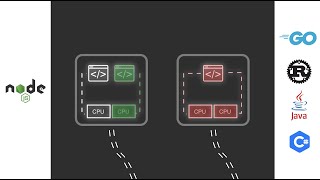
Node.js is a JavaScript runtime that lets you run JavaScript outside the browser — on servers, command lines, and IoT devices. Built on Chrome's V8 engine, it uses a non-blocking, event-driven architecture that excels at I/O-heavy applications like APIs, real-time servers, and build tools.
How Node.js Works
Node.js unified frontend and backend development under one language — JavaScript. This means one team can build the entire stack, share code between client and server, and use the same package manager (npm) everywhere.
Node.js is not for CPU-intensive tasks (use Go or Rust instead). It excels at I/O-bound work: API servers, real-time chat, streaming, file processing, and microservices. Express, Fastify, and Hono are popular Node.js web frameworks.
The Node.js ecosystem (npm) has 2M+ packages — the largest package registry in any language. Alternatives like Bun and Deno provide faster performance and modern features while maintaining Node.js compatibility.
Why Developers Use Node.js
Node.js powers the backends of Netflix, LinkedIn, PayPal, Uber, and countless startups. It's the most popular server-side JavaScript runtime and the foundation of the modern web development toolchain (webpack, Vite, ESLint all run on Node).
Key Concepts
- Event Loop — Node.js processes I/O operations asynchronously — handles thousands of connections without blocking on any single one
- npm — Node Package Manager — the world's largest software registry with 2M+ packages
- Express — The most popular Node.js web framework — minimal, flexible, and middleware-based
- Streams — Process data in chunks without loading everything into memory — essential for file processing and HTTP responses
- Worker Threads — Run CPU-intensive code in parallel without blocking the main event loop
- CommonJS vs ESM — Two module systems — require() (legacy) and import/export (modern standard)
Node.js HTTP Server
javascript
const http = require('http');

const server = http.createServer((req, res) => {
  if (req.url === '/api/hello') {
    res.writeHead(200, { 'Content-Type': 'application/json' });
    res.end(JSON.stringify({ message: 'Hello from Node.js!' }));
  } else {
    res.writeHead(404);
    res.end('Not Found');
  }
});

server.listen(3000, () => console.log('Server running on port 3000'));
Learn Node.js — Top Videos
8:18  2:06:35
  8:55
8:55  3:45
3:45 How to Setup Node.js with TypeScript in 2023 Beyond Fireship
456.4K views · 14.1K likes · 3 years ago
 16:00:45
 Build & Launch an Enterprise-Level Food Ordering Platform: React Node.js MongoDB Auth Stripe & More! Chris Blakely
434.6K views · 14.1K likes · 2 years ago
 2:23:19
 Node.js Educators

Traversy Media
@traversymedia
AI Coding
Traversy Media features the best online web development and programming tutorials for all of the latest web technologies...
2.4M Subs
1K Videos
72.8K Avg Views
5.87% Engagement

Net Ninja
@netninja
AI Coding
Black-belt your web development skills. Over 2000 free programming tutorial videos about: - Modern JavaScript (beginner...
1.9M Subs
2.8K Videos
17.9K Avg Views
1.4% Engagement

LearnCode.academy
@learncodeacademy
Web Dev
100% FREE Web Development tutorials, web site design tutorials and more. Including, but not limited to: HTML, CSS, Java...
774K Subs
168 Videos
79.8K Avg Views
2.81% Engagement

Dave Gray
@davegrayteachescode
Web Dev
Web Development tutorials with full courses on HTML, CSS, JavaScript, React, Node.js and more! My goal is to help you ...
436K Subs
463 Videos
27.7K Avg Views
4.11% Engagement

Lama Dev
@lamadev
Web Dev
Web development tutorials for everyone. Learn JavaScript, React.js, Next.js and Node.js, find inspiration for HTML, CSS,...
359K Subs
103 Videos
69.6K Avg Views
3.07% Engagement

Omnidev
@omnidev_
Web Dev
I am Omnidev, the everything dev. I code primarily with Javascript as a full-stack web developer. We'll use Node.js to c...
167K Subs
19 Videos
216.6K Avg Views
0.43% Engagement
Frequently Asked Questions
Is Node.js a programming language?
No. Node.js is a runtime environment that executes JavaScript code. JavaScript is the language; Node.js is the platform that lets it run on servers.
Node.js vs Bun vs Deno?
Node.js has the largest ecosystem and most production deployments. Bun is the fastest and includes a bundler/test runner. Deno has better security defaults and native TypeScript. For production, Node.js is safest; for new projects, try Bun.
Is Node.js good for large applications?
Yes, with proper architecture. Companies like Netflix and PayPal run massive Node.js deployments. Use TypeScript, follow microservices patterns, and choose a framework (Fastify, NestJS) that provides structure.
Want a structured learning path?
Plan a Node.js Lesson →